

ProjQik

A Build Smarter Application from FFAI.

Open Less. Do More.
Find Everything.

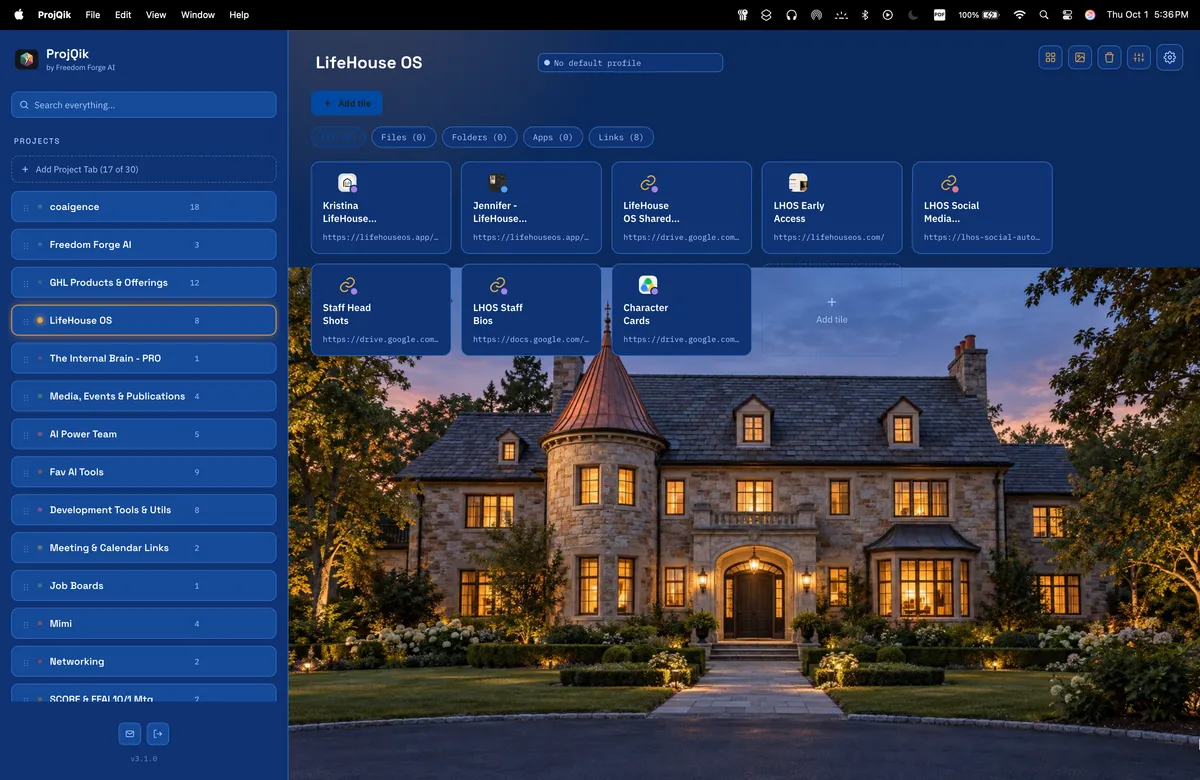
ProjQik puts everything tied to a project or subject in one visual, one-click workspace on your computer.

Built for people who run more than one thing at once, ProjQik organizes multiple color-coded projects and brings the resources scattered across your computer and browser together around the work they belong to.

Files Folders Apps Web Links
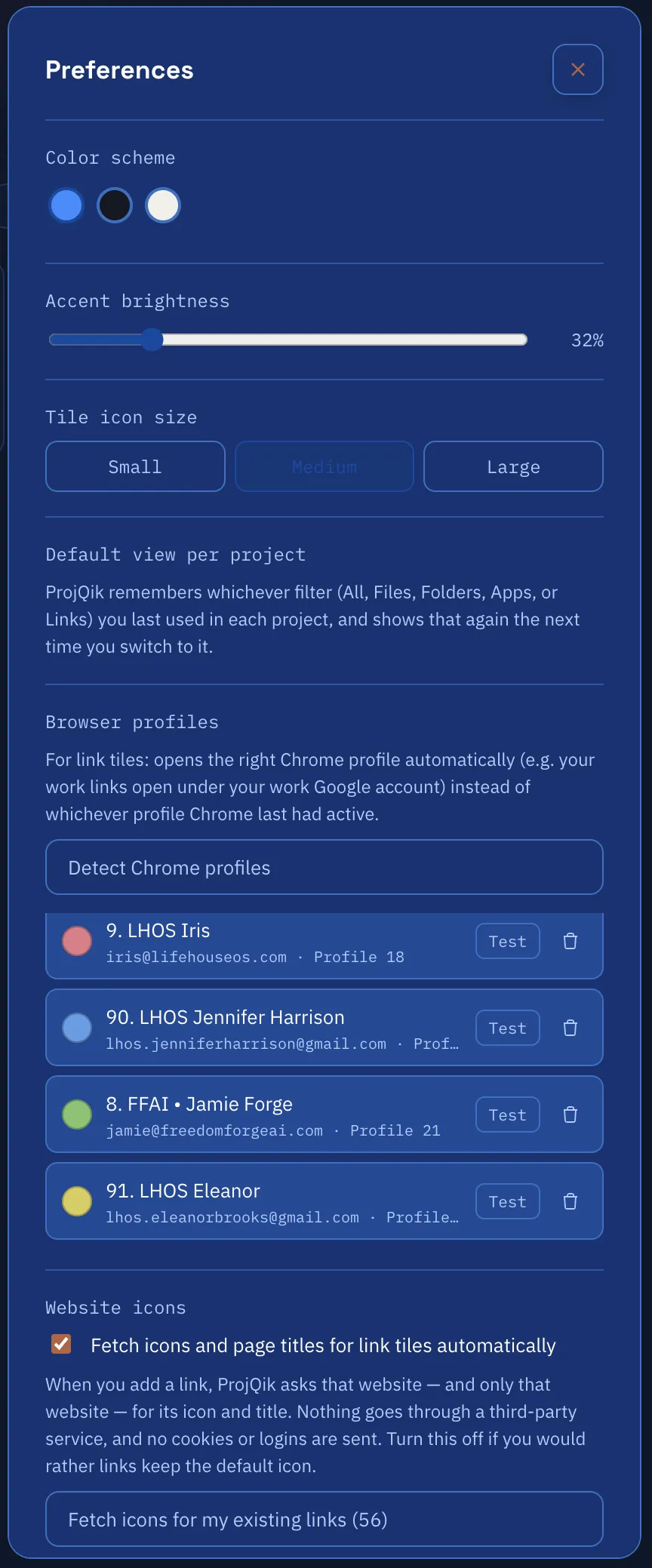
Working across multiple Google identities? ProjQik can route a web link through the Chrome profile assigned to that project or to the individual link.

What Is ProjQik?

Your projects finally have a front door.

ProjQik is a Windows, Mac, Linux OS project launcher that puts the resources for each project into one visual workspace.

Instead of remembering where everything lives, create a project and bring together its files, folders, apps and web links.

Each becomes a visual tile you can open directly from ProjQik, giving you a faster way to move from deciding what you need to actually working with it.

With support for up to 25 color-coded projects, ProjQik is built for consultants, founders, freelancers, agency owners and other power users managing multiple workstreams at the same time.

The Problem

The work is organized. Finding it isn't.

A single project can stretch across Finder, applications, browser bookmarks and multiple Google identities.

  • Files disappear into nested folders.
  • Important links get buried in bookmarks.
  • Apps and resources live in different places.
  • The wrong Google account opens at exactly the wrong moment.
  • Projects multiply, overlap and accumulate duplicate resources.

Every search, wrong click and account switch creates another small interruption between you and the work you were trying to do.

ProjQik tackles the underlying problem: context-switching overhead.

What It Does

Build a launchpad for every project.

Create a visual project space, add the resources that belong to it, then launch what you need directly from ProjQik.

Create up to 25 projects with distinct, color-coded tabs.
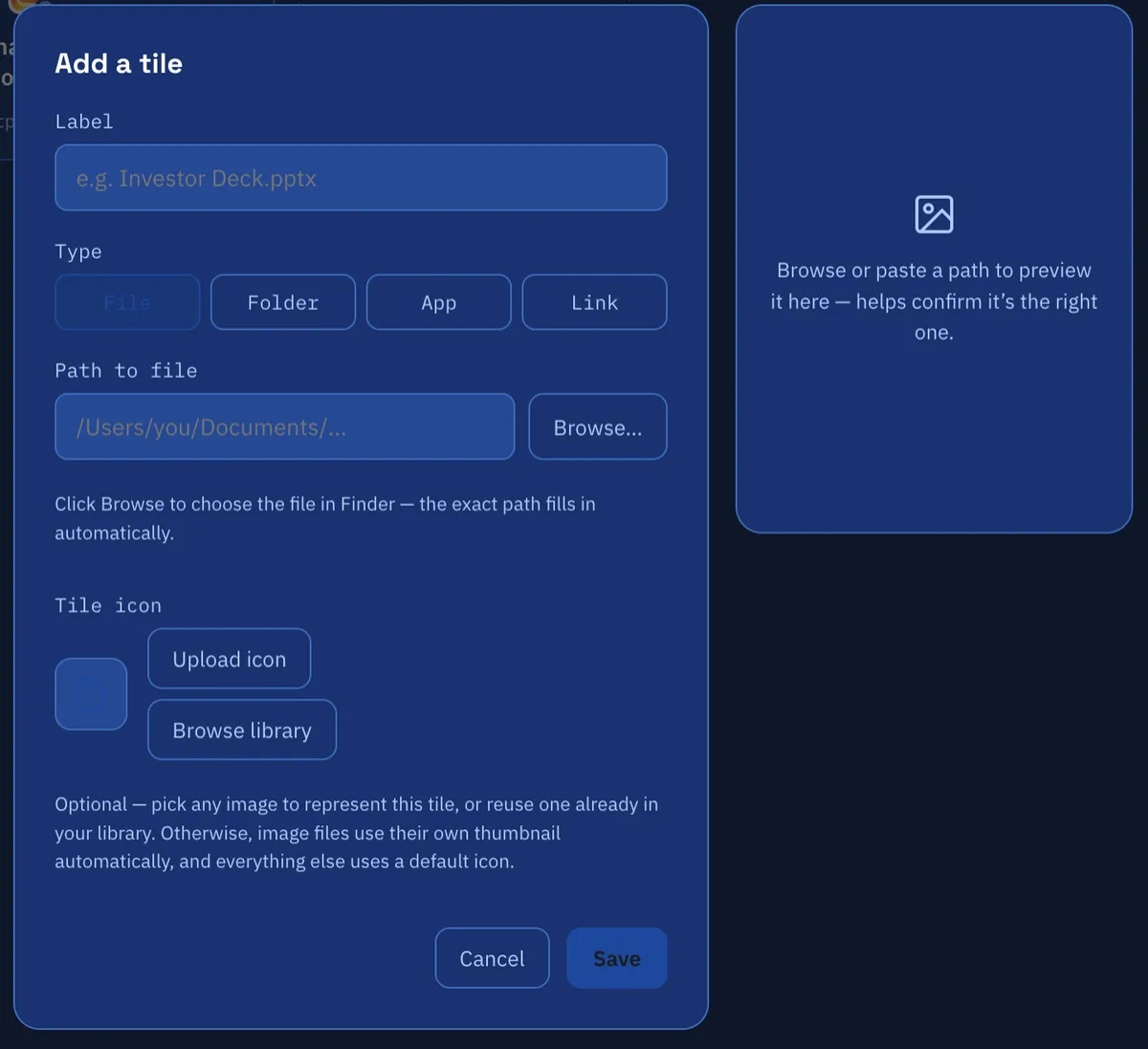
Add files, folders, apps and web links as visual tiles.
Open resources with one click instead of retracing where you stored them.
Search across active projects when you know what you need but not where you put it.
Archive, reorder and merge projects as your work changes over time.

How It Works

Set it up once. Get there faster.

1

Create your project.

Give each client, company or workstream its own dedicated project space.

2

Add what belongs there.

Add files, folders, applications and web links, including items dragged directly from Finder.

3

Set the right browser identity.

Assign a default Chrome profile to the project and, when needed, override it for an individual link.

4

Click and go.

Open the resource directly from its project instead of searching for it again.

That includes Chrome. A saved link can open using the Chrome profile assigned to that project or link, helping keep work identities in the right lane.

Key Features

Small clicks. Serious organization.

ProjQik combines project organization, resource launching and browser identity management in one macOS workspace.

Up to 25 Projects

Create color-coded project tabs and reorder them around the way you work.

Four Tile Types

Add files, folders, applications and web links to the project where they belong.

Chrome Profile Routing

Set a default Chrome profile by project or assign a different profile to an individual link.

Global Search

Search across active projects and jump directly to the resource you need.

Drag & Drop

Add items from Finder or move existing tiles between projects.

Backup & Restore

Export projects, tiles, settings and assets, then import them when needed.

Real-World Use Cases

Built for the "I have five things going on" crowd.

ProjQik is designed for people whose work does not fit neatly inside one folder, one browser identity or one company.

Consultants

Give each client its own project with the documents, folders, tools, websites and Google identity used for that engagement.

Founders & Entrepreneurs

Separate resources for different businesses, products and initiatives without separating your entire digital life.

Agency Owners & Freelancers

Move between client environments while keeping the right assets, applications, links and browser profiles together.

Multi-Project Power Users

Create a dedicated launch point for overlapping workstreams instead of keeping another mental map of where everything lives.

Benefits & Outcomes

Spend less time finding. More time doing.

ProjQik reduces the little interruptions that pile up when your work is spread across projects, tools and identities.

Fewer digital scavenger hunts

Go to the project first instead of remembering which folder, bookmark or app contains what you need.

Less context switching

Keep related resources together so moving into a project takes fewer steps.

Cleaner separation between projects

Give clients, companies and workstreams their own organized launch point.

Fewer wrong-account moments

Route Chrome links through the profile associated with the project or individual resource.

A workspace that can evolve

Reorder, archive, restore and merge projects as priorities and responsibilities change.

The ProjQik Experience

Open ProjQik. Pick the project. Go.

The experience is intentionally visual and direct. Your projects become the starting point instead of the applications and folders where their pieces happen to live.

01

Choose the project

Jump into a color-coded project tab dedicated to that workstream.

02

See what belongs to it

Files, folders, apps and links appear together as visual tiles.

03

Click what you need

Launch the resource directly without navigating back through its original location.

04

Stay in the right context

Chrome links can open using the profile assigned to that project or link.

The goal is simple: shorten the distance between "I need that" and "I'm working on it."

What Makes It Different

Organized around the project. Not the tool.

Most digital organization starts with where something lives. ProjQik starts with what you are working on.

One project. Different resource types.

Files, folders, applications and web links can live together in the same project workspace.

Browser identity becomes part of the project.

Chrome profile routing connects a saved web resource with the identity you actually use to access it.

It works with what you already have.

ProjQik does not require you to move your original files into a new filing system just to organize access to them.

Built for overlapping work.

Projects can be reordered, archived, restored and merged as your workload changes.

ProjQik connects the project, its resources and its browser identity in one launch point.

Privacy & Trust

Your Chrome profile is not an open book.

Chrome profile routing needs enough information to know which profile to open. That does not mean ProjQik needs access to everything inside it.

What ProjQik reads

The Chrome profile display name and signed-in email used to identify available profiles.

Cookies

No. ProjQik does not read, store or access Chrome cookies.

Passwords

No. ProjQik does not read, store or access your passwords.

Browser session data

No. ProjQik does not read, store or access Chrome session data.

The boundary is deliberate: identify the Chrome profile needed to launch the link, without accessing the private contents of that profile.

Who It's For

Built for people who run more than one thing at once.

ProjQik is designed for Mac users whose work crosses projects, clients, companies, tools and browser identities.

Consultants

Keep each client engagement and its working resources separated, organized and ready to launch.

Founders & Entrepreneurs

Move between businesses, products and initiatives without rebuilding the mental map every time.

Agency Owners

Give different clients and accounts their own project environment while working from the same Mac.

Freelancers

Keep client files, folders, applications, links and browser identities together by project.

If your Mac supports several different versions of your working life, ProjQik was designed with that reality in mind.

Sound Familiar?

You may need ProjQik if...

✓

You regularly ask yourself, "Where did I put that?"

✓

Your work is scattered across Finder, bookmarks and multiple apps.

✓

You manage multiple clients, companies or projects from the same Mac.

✓

You've opened a link and realized, "Wait, which Google account am I in?"

✓

Your projects have started to overlap, duplicate or blur together.

✓

You have too many browser tabs open because closing them feels like losing your place.

The common thread? Your problem may not be having too much work. It may be having too many places to go to get to it.